Lead Intake API
Send Leads into coreCRM straight from your own system. One authenticated POST creates the Deal, the Company, and the Contact, and drops it into the pipeline your reps already work.
Quick start
A Lead you send becomes a Deal in one of your sales pipelines. In the same request coreCRM finds or creates the Company and the Contact attached to it. One call, three records.
-
1
Create an API key
An admin generates it in coreCRM under Settings, then API Keys.
-
2
Find your pipeline ID
Call GET /pipelines once and note the ID you want Leads to land in.
-
3
POST the Lead
Send pipeline_id, title, and company.name as a minimum.
| Base URL | https://corecrm.guru/api/v1 |
|---|---|
| Endpoint | POST /deals |
| Auth | Authorization: Bearer YOUR_KEY |
| Sandbox | None. See Testing safely. |
Authentication
coreCRM uses a bearer API key. The key identifies your coreCRM account, so every record it creates lands in that account and nowhere else.
Getting a key
An admin on the coreCRM account creates it. Sign in, then open Settings and choose API Keys.
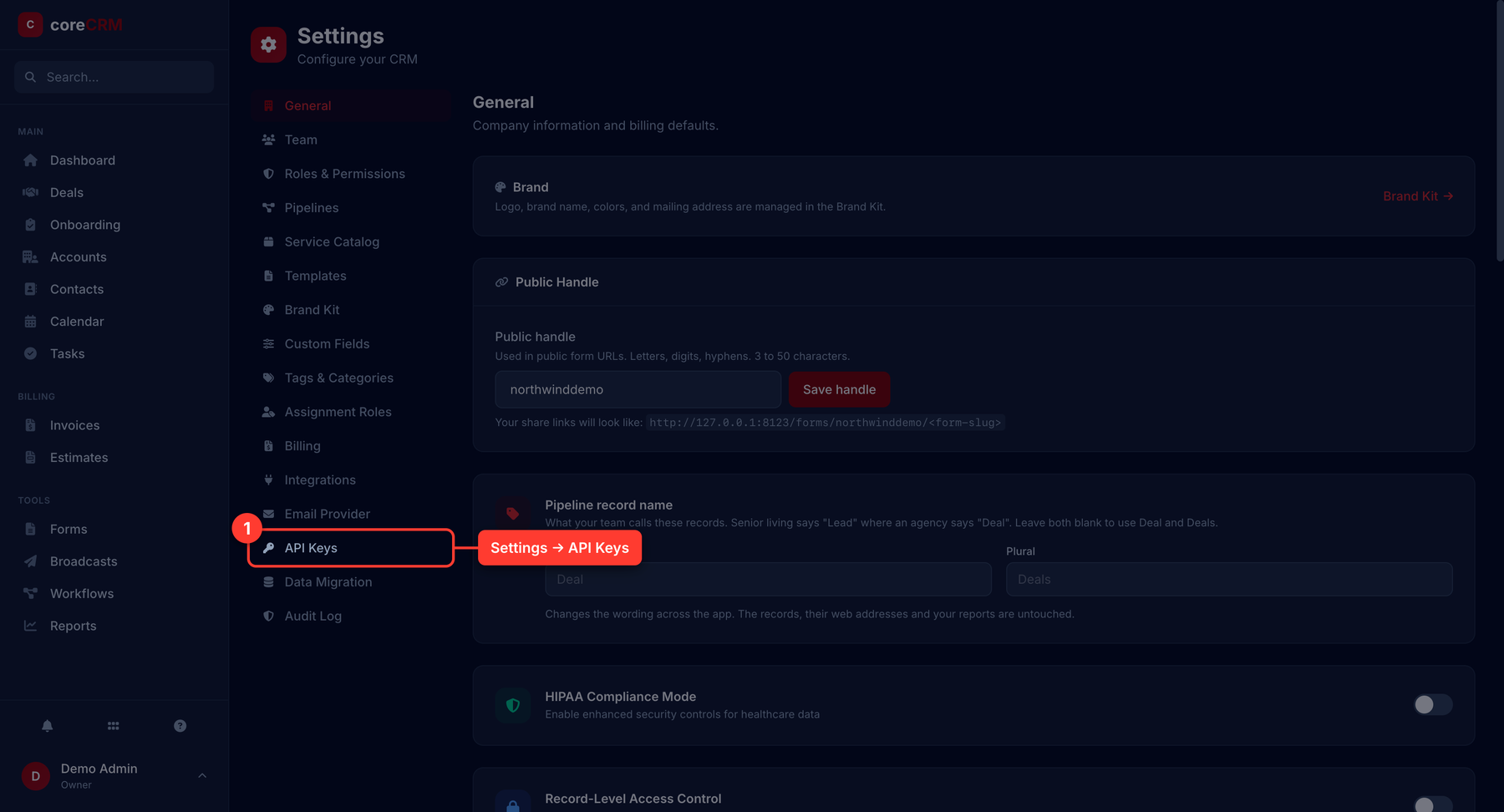
Fill in a Name so you can recognise the key later, and the App that will use it, then press Create Key.
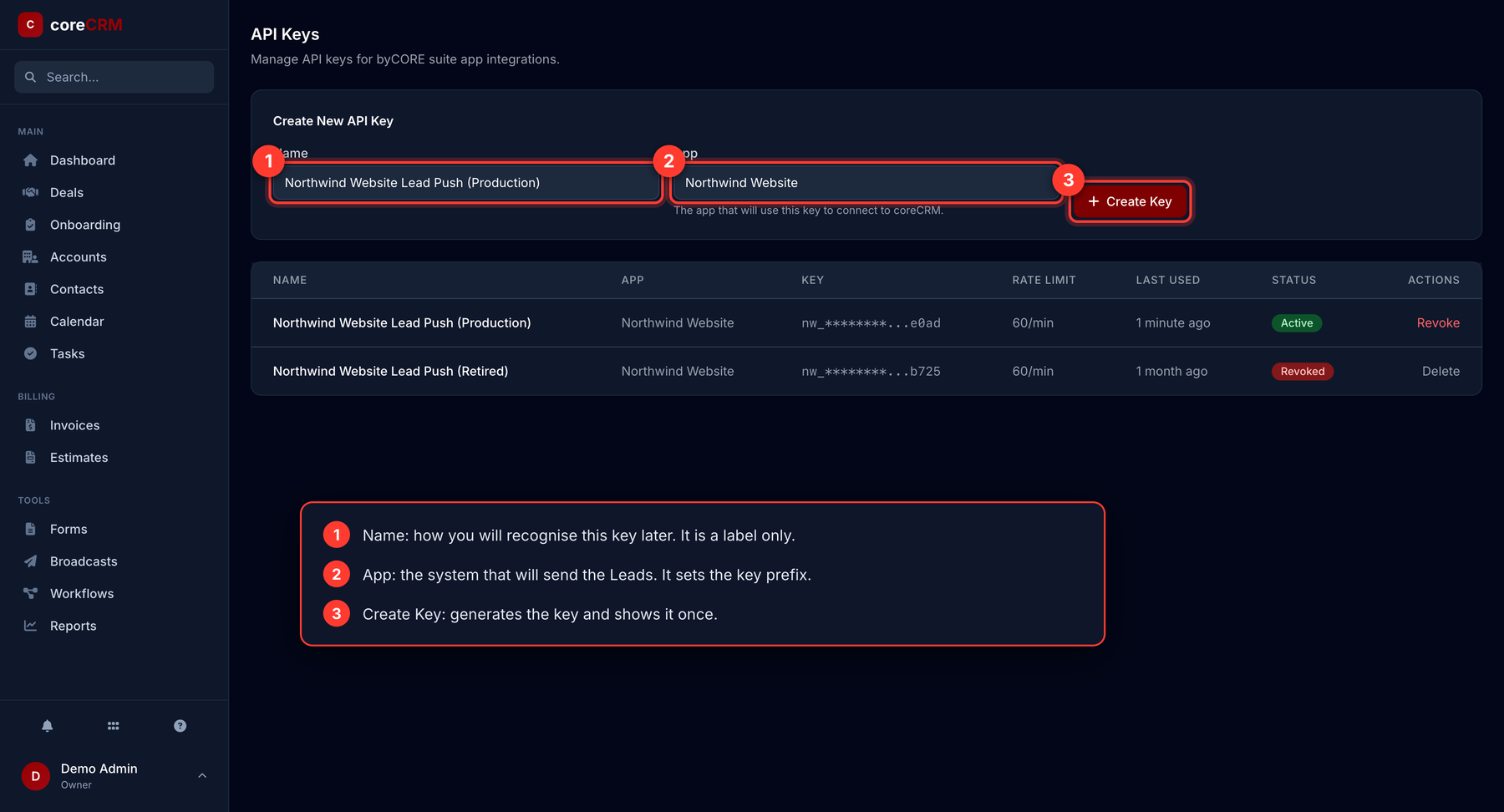
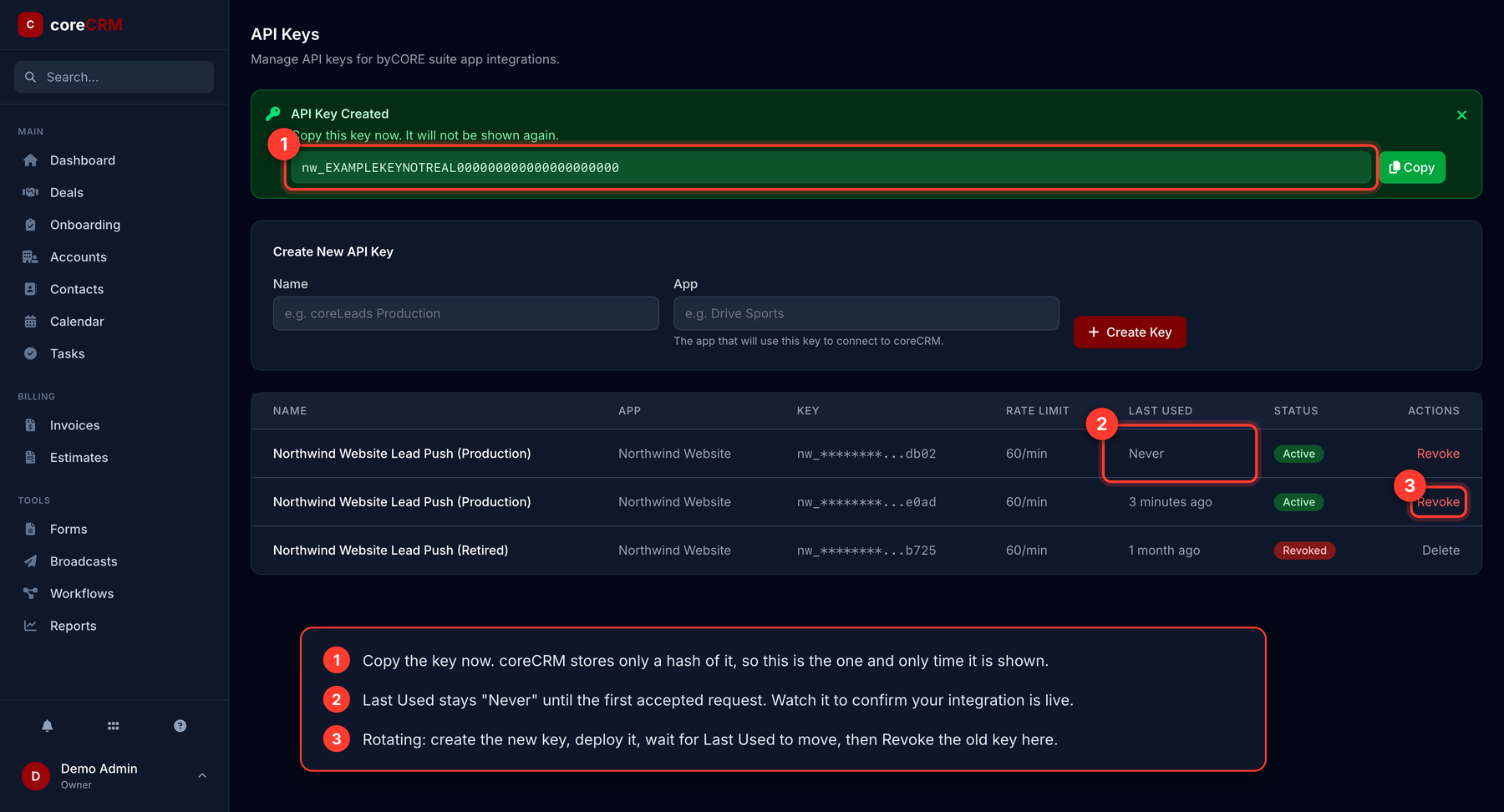
Copy the key immediately. coreCRM stores only a SHA-256 hash of it, so it is shown once and can never be displayed again. If you lose it, create a new one.
Sending the key
Pass it as a bearer token. There is no query-parameter or request-body alternative.
Authorization: Bearer cl_YOUR_KEY_HERERotating and revoking
Keys have no expiry, so rotation is manual. It can be done with no downtime:
- Create a second key on the same screen.
- Deploy the new key to your system.
- Wait for the Last Used column on the new key to move. It updates on every accepted request.
- Press Revoke on the old key.
Revoking takes effect immediately. Revoked keys stay listed so you keep the audit trail, and Delete removes the record entirely. Neither touches any Deal, Company, or Contact the key created. A revoked key returns exactly the same response as a key that never existed, so your error handling does not need to tell the two apart.
Request headers
| Header | Value | Why |
|---|---|---|
| Authorization | Bearer YOUR_KEY | Required. Identifies the account. |
| Content-Type | application/json | Required. The body is JSON. |
| Accept | application/json | Recommended, not required. Responses are JSON either way. |
Changed on 21 August 2026. Every response from /api/v1, successes and errors alike, is now JSON whatever you put in Accept. Before that date a request that failed validation without Accept: application/json returned a 302 redirect to an HTML page. If your integration carries a workaround for that, you can remove it.
Create a Lead
Request fields
pipeline_id, title, and company.name are the only required fields. The whole contact object is optional; omit it and the Deal is created against the Company with no Contact attached.
| Field | Type | Required | Constraints | Notes |
|---|---|---|---|---|
| pipeline_id | integer | Required | Must be a pipeline in your own account | Get it from GET /pipelines. A pipeline belonging to another account is rejected. |
| title | string | Required | Max 255 characters | The Deal name reps see in the pipeline. |
| company.name | string | Required | Max 255 characters | Also the deduplication key for Companies. |
| stage_id | integer | Optional | Must be a stage of the pipeline named in pipeline_id | Defaults to that pipeline's first stage by position. |
| value | number | Optional | Numeric, 0 or greater | Estimated deal value. Sets both the deal value and the setup value so the Deal does not display as $0. |
| contact.name | string | Optional | Max 255 characters | Split on the first run of whitespace. "Dana Vega" becomes first Dana, last Vega. |
| contact.email | string | Optional | Valid email, max 255 characters | The deduplication key for Contacts. Strongly recommended. |
| contact.phone | string | Optional | Max 50 characters | Stored as sent, no formatting applied. |
| company.website | string | Optional | Valid URL, max 255 characters | Must include the scheme, for example https://example.com. |
| company.address | string | Optional | Max 255 characters | Street address. |
| company.city | string | Optional | Max 100 characters | |
| company.state | string | Optional | Max 100 characters | |
| company.zip | string | Optional | Max 20 characters | |
| company.industry | string | Optional | Max 100 characters | Free text, not a fixed list. |
| metadata | object | Optional | Any JSON object | Stored on the Deal as custom fields. Use it for your own identifiers and scoring. |
Fields coreCRM sets for you
These cannot be supplied by the caller. Sending them does nothing: they are ignored without an error.
| Field | Value | Notes |
|---|---|---|
| Lead source | coreLeads | Set server-side. Put your own source value in metadata instead. |
| Status | open | Every Lead arrives open. Reps move it from there. |
| Assigned rep | Unassigned | No owner field on this endpoint. Assign in the app, or use a coreCRM workflow to auto-assign on deal creation. |
If you need any of these three set from your side, that is a change to coreCRM rather than something you can configure. Talk to us.
Example request
Replace pipeline_id with a real pipeline from your account and cl_YOUR_KEY_HERE with your key. Everything else can be sent as-is.
curl -X POST https://corecrm.guru/api/v1/deals \
  -H "Authorization: Bearer cl_YOUR_KEY_HERE" \
  -H "Content-Type: application/json" \
  -H "Accept: application/json" \
  -d '{
    "pipeline_id": 3,
    "title": "Roof replacement - Vega Roofing",
    "value": 12500,
    "contact": {
      "name": "Dana Vega",
      "email": "[email protected]",
      "phone": "(555) 0142"
    },
    "company": {
      "name": "Vega Roofing",
      "website": "https://example.com",
      "address": "400 Harbour Way",
      "city": "Tampa",
      "state": "FL",
      "zip": "33602",
      "industry": "Construction"
    },
    "metadata": {
      "campaign": "spring-roofing",
      "external_id": "LEAD-90210"
    }
  }'
Success response
{
  "id": 4812,
  "url": "https://corecrm.guru/app/deals/4812",
  "pipeline": "Inbound Leads",
  "stage": "New Lead"
}| id | The Deal ID. Store it if you want to link back or fetch the Deal later. |
|---|---|
| url | Direct link to the Deal in coreCRM. Safe to put in your own admin UI. |
| pipeline | Name of the pipeline the Deal landed in. |
| stage | Name of the stage the Deal landed in. |
The response deliberately contains no Contact or Company details.
Duplicate handling
Read this before you go live. The three records behave differently.
| Record | Matched on | On a match |
|---|---|---|
| Company | Exact company.name in your account | Reuses it. The other company.* fields you sent are ignored, not applied as an update. |
| Contact | Exact contact.email in your account | Reuses it. The name and phone you sent are ignored, not applied as an update. |
| Deal | Nothing | Always creates a new Deal. |
There is no idempotency. Posting the same payload twice creates two Deals pointing at the same Company and Contact. The endpoint accepts no idempotency key. If your system may retry (a timeout, a queue redelivery, a user double-submit), deduplicate on your side before calling, and put your own identifier in metadata.external_id so a duplicate can be spotted afterwards.
A Contact with no email is never matched. Omit contact.email and coreCRM creates a fresh Contact on every request, because email is the only key it matches on. Send the email whenever you have it.
Errors
Every error returns JSON. You do not need to send any particular Accept header to get it.
No credential
The Authorization header is missing or is not a bearer token.
{
  "error": "API key required"
}Bad credential
The key is wrong, or has been revoked or deleted. Revoked and nonexistent keys are intentionally indistinguishable.
{
  "error": "Invalid API key"
}Validation failure
A required field is missing or a value breaks a constraint. The errors object is keyed by field, using dot notation for nested fields. Do not retry a 422 unchanged.
{
  "message": "The title field is required.",
  "errors": {
    "title": ["The title field is required."]
  }
}Several problems at once
When more than one field fails, message names the first and errors lists them all.
{
  "message": "The pipeline id field is required. (and 2 more errors)",
  "errors": {
    "pipeline_id": ["The pipeline id field is required."],
    "title": ["The title field is required."],
    "company.name": ["The company.name field is required."]
  }
}No such route
Usually a typo in the path. There is no /leads endpoint; Leads are created at /deals.
{
  "message": "The route api/v1/leads could not be found."
}Wrong method
The path exists but does not accept the verb you used.
{
  "message": "The PUT method is not supported for route api/v1/deals. Supported methods: POST."
}Rate limited
retry_after is seconds. The same number is in the Retry-After header. Wait that long and retry.
{
  "error": "Rate limit exceeded",
  "retry_after": 37
}Server error
Nothing was saved. The whole Lead is written in a single database transaction, so a failure leaves no partial Company or Contact behind. Safe to retry.
{
  "error": "Failed to create deal",
  "message": "..."
}
Rate limits
The limit is per API key, counted per minute, and defaults to 60 requests per minute. The exact figure for a key is shown in the Rate Limit column on the API Keys screen.
Every response, successful ones included, carries:
| X-RateLimit-Limit | Requests allowed per minute for this key. |
|---|---|
| X-RateLimit-Remaining | Requests left in the current window. |
| Retry-After | On a 429 only. Seconds until the window resets. |
Watch X-RateLimit-Remaining and slow down before you hit zero. If you need to import in bulk, spread the calls out rather than requesting a higher limit. The limit is set by corePHP and is not tenant-configurable.
Helper endpoints
Two read endpoints support the integration. Both take the same bearer key.
Find your pipeline and stage IDs
{
  "data": [
    {
      "id": 3,
      "name": "Inbound Leads",
      "is_default": true,
      "stages": [
        { "id": 11, "name": "New Lead",  "position": 1, "probability": 10, "color": "#94a3b8" },
        { "id": 12, "name": "Contacted", "position": 2, "probability": 25, "color": "#60a5fa" }
      ]
    }
  ]
}
Only pipelines in your own account are returned. IDs are stable, so fetch them once at setup rather than before every Lead.
Check a key works
{
  "tenant": "Acme Home Services",
  "tenant_id": 42
}
This creates nothing, so it is the safest way to confirm a key is live and pointed at the right account. Use it as your integration's health check.
Testing safely
coreCRM has no sandbox, no test environment, and no test mode. There is no flag that makes a request a no-op. Every accepted call to POST /deals creates real records in the live account.
Test like this instead:
- Call GET /me first. It writes nothing and proves the key and account are right. Most credential mistakes are caught here.
- Create a throwaway pipeline in coreCRM, called something like API Test, and point pipeline_id at it while you build. Test Leads stay out of the pipelines your reps actually watch.
- Tag your test traffic with something you can search for later, for example "metadata": { "external_id": "TEST-001" }.
- Delete the test Deals when you are finished, and switch pipeline_id to the real pipeline as the last step of going live.
Exercise your error handling with deliberately broken requests. They are free, because a request that fails never creates anything.
# Expect 401 {"error":"Invalid API key"}
curl -X POST https://corecrm.guru/api/v1/deals \
  -H "Authorization: Bearer cl_definitely_not_a_real_key" \
  -H "Content-Type: application/json" -H "Accept: application/json" \
  -d '{"pipeline_id":3,"title":"t","company":{"name":"c"}}'

# Expect 422, errors.title
curl -X POST https://corecrm.guru/api/v1/deals \
  -H "Authorization: Bearer cl_YOUR_KEY_HERE" \
  -H "Content-Type: application/json" -H "Accept: application/json" \
  -d '{"pipeline_id":3,"company":{"name":"Vega Roofing"}}'
Integration checklist
- Key created in coreCRM and stored as a secret, not committed to source control.
- GET /me returns the expected account name.
- pipeline_id read from GET /pipelines, not hardcoded from a guess.
- Authorization and Content-Type sent on every request.
- contact.email sent whenever available, so Contacts deduplicate.
- Your own identifier sent in metadata.external_id.
- Retries deduplicated on your side, because the endpoint is not idempotent.
- 401, 422 and 429 each handled distinctly. Retry 429 after retry_after; never retry 422 unchanged.
- X-RateLimit-Remaining monitored.
- Test Deals deleted and pipeline_id switched to the live pipeline.
Scope and support
Version 1 writes Leads only. There is currently no public API to list, search, or update Leads, and none for any other object. If you need to read Leads back, tell us so it can be scoped properly.
For help, send the request timestamp, the payload you sent (minus the key), and the full response body including the status code.
Need something this API does not do yet?
Reading Leads back, setting the assigned rep, or a higher rate limit. Tell us what the integration needs.
Talk to us